


ポップアップウェブカメラ搭載
高い機能性
6000 シリーズ
45(44.5 インチ/113 cm 対角)
5120 x 1440(デュアル QHD)
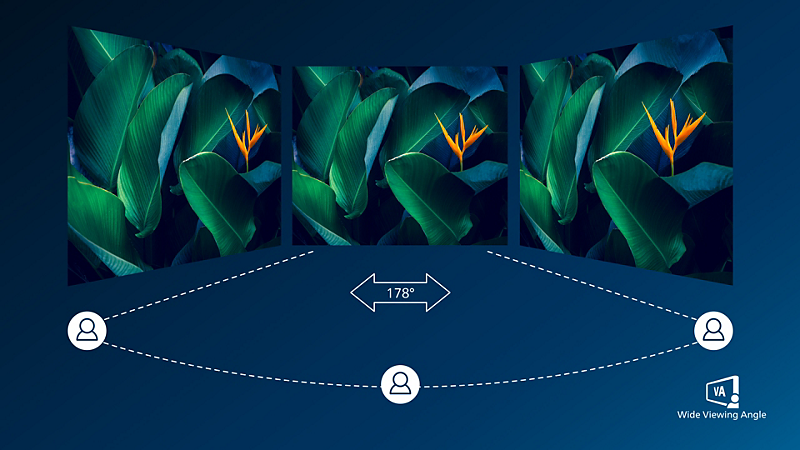
ワイドアングル表示により、高画質を実現する VA ディスプレイ
フィリップスの VA LED ディスプレイは、高度なマルチドメイン化によるバーティカルアライメント(垂直配向)テクノロジーを採用し、極めて鮮明で明るい画像向けに非常に高いスタティックコントラスト比を実現します。このディスプレイは、標準的なオフィス用途はもちろんのこと、特に写真、ウェブの閲覧、映画、ゲーム、要求の厳しいグラフィックス系用途に最適です。最適化されたピクセル管理テクノロジーにより 178/178 度の超広視野角を提供し、画像をくっきりと表示します。

DisplayHDR 400 が実現する生命力あふれる優れたビジュアル
VESA 策定 DisplayHDR 400 規格は、一般的な SDR ディスプレイから大きく進化したビジュアル体験を提供します。他の「HDR 互換」製品とは一線を画した DisplayHDR 400 対応製品は、息を呑むほどの輝度やコントラスト、色彩を実現します。より深くニュアンスのある黒の表現に加え、グローバルディミングと 400 nit 以上の輝度により実物さながらのイメージを再現。今まで表現しきれなかった色を再現し、見る人を魅了するビジュアル体験を創造します。

RJ-45 to USB-C が安全なネットワーク接続を手軽に実現
モニターから PC まで、すべての周辺機器を USB Type-C コネクター付きの 1 本のケーブルですっきり接続。ネットワーク接続や、PC からモニターへの高解像度ビデオの出力、さらには、ネットワークケーブルの追加なしでウェブアクセスが LAN ポートのないノート PC でも可能です。USB-C 経由の RJ45 接続では、必要に応じて高速かつ安全な接続を提供。最速のデータ速度により、HDD から PC にいまだかつてないスピードでデータを転送できます。さらに、電源供給可能な USB-C のため、電源ケーブルなしで、モニターからノート PC への電源供給や充電も可能です。
技術仕様
アワード

レビュー
2.0
5 中
1
レビュー
System Analyst
04/09/2025

New Zealand
Doesn't work as advertised
Using this Monitor for 3 years now - I am an analyst, there are a few disappointing factor to this beautiful monitor: 1- KVM feature and switching between laptops can only be done using the remote and it's not even the first option in the setting so you have to scroll down the page , no shortcut on the remote which basically makes it not practical, you end up disconnecting one 2- KVM uses one of the laptops as the connecting station i.e. if you connect the network cable to your monitor, it only serves the main laptop, the second laptop will be connected to the wifi and so is the audio. 3- Hight of the screen is mot enough to pars through spreadsheets or comparing documents 4- Camera's quality is not good, the light is not good and it's not adjustable - you end up moving the gigantic monitor just to align the camera 5- Never been able to use the mic, the quality is so poor nobody hears me in the meetings, ended up using the laptop's mic 6- Speaker's quality is poor - ended up using the laptop Verdict: It's not worthy of price, far too expensive and it doesn't serve you as advertised. you are better off using two 27" So basically you pay so much and get a normal 42" monitor - why would you
これは Curved Business Monitor 45B1U6900CH 32:9 SuperWide curved monitor with USB-C に対するレビューです
これは Curved Business Monitor 45B1U6900CH 32:9 SuperWide curved monitor with USB-C に対するレビューです
ニュースレターを購読
- ✓ フィリップスの最新情報をメールでお届け
- ✓ 特別なオファーやキャンペーンのご案内
- ✓ 製品モニターのご案内
- ✓ フィリップスの最新情報をメールでお届け
- ✓ 特別なオファーやキャンペーンのご案内
- ✓ 製品モニターのご案内
ディスプレイの湾曲半径(ミリ単位)
応答時間値は SmartResponse に相当
NTSC 領域(CIE1976)
sRGB 領域(CIE 1931)
USB-C ビデオ転送には、お使いのノート PC またはデバイスで USB-C DP Alt モードへの対応が必要
インターネットを介したアクティビティ(画面シェア、ビデオやオーディオのオンラインストリーミングなど)は、ネットワークパフォーマンスに影響を及ぼします。お使いのハードウェア、ネットワーク帯域幅、ネットワークパフォーマンスによって、オーディオやビデオの全体的な品質が決まります。
USB-C の電源供給および充電機能については、お使いのノート PC/デバイスが USB-C 標準の電源供給仕様に対応している必要があります。詳細は、ノート PC のユーザーマニュアルを参照していただくか、メーカーまでお問い合わせください。
イーサネット接続が遅く感じられる場合は、OSD メニューで USB 3.0 以上(LAN 速度 1G に対応)を選択してください。
本ディスプレイの USB-C 電源供給は最大 100 W(通常 96 W)です。電源供給の最大値はデバイスによって異なります。
PowerSensor による電力コスト削減の計算では、USB と電源供給はともに除外されます。
EPEAT レーティングは、フィリップスが製品を登録している国でのみ有効です。お住まいの国における登録状況については、https://www.epeat.net/ でご確認ください。
RJ45 は、対応するシステムにおいて PXE(Preboot eXecution Environment)、MAC アドレスパススルー(MAPT)、および Wake on LAN(WOL)をサポートします。サポート内容は、システム構成によって異なる場合があります。
実際のモニターは図と異なる場合があります。